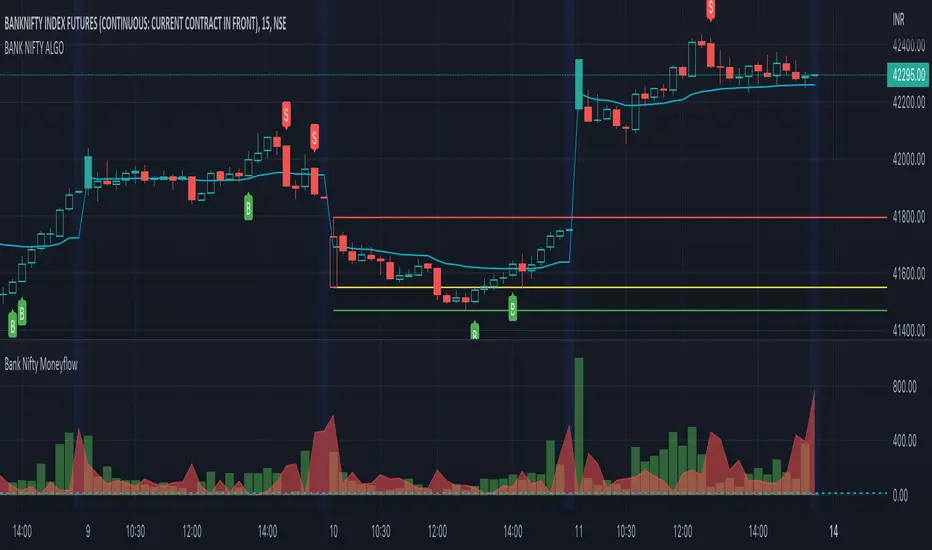
BANK NIFTY ALGO This indicator is specifically designed for trading Bank Nifty (NSE) for intraday trading & short term swing trading
Description :
This indicator is based on Price Action Theory, Volume Profiles and Moneyflow Analytics. It also incorporates important parameters of the underlying assets such as Banking stocks & key benchmark banking metrics. It shows the bias of the index at any given point of time.
USP: It reacts to change in price momentum if that is sustainable; thereby eliminating random spikes & offshoots in price. This is much more conservative way of trading & gives signal only when the trend is strongly stabilized.
How to use ?
Timeframe : Time duration for each bar (Input to given to the indicator by user)
Notations used in the indicator:
B- Signal for Buy
S- Signal for Sell
CS- Close Shorts
CL- Close Longs
BookLong- Book all Longs
BookShort- Book all Shorts
Critical Pivot is a point which is defined as the boundary of bullish & bearish sides. This is the thick line which changes color green to maroon to grey. It gives an idea of bias in the market. Green color is for Bullish bias, Maroon for Bearish bias & Grey for Neutral
Swing High: The dynamic green line at the end of the charts
Swing Low : The dynamic red line at the end of the charts
Major uses of the Indicator:
1. Understanding the direction of Bank Nifty and understands levels for entry / exits --- B & S signals
2. Understanding SL levels in order to prevent loss during unforeseen events ------------- Break of the critical pivot ( green/maroon line )
3. Understanding Trailing SL levels to hold on to the winners --------------------------------- Break of the Green/Red Line
Ideal Timeframes for this Indicator :
1.Intraday ( 5 min/15 mins )
2.Swing ( 30 mins/1 hour)
Disclaimer: This script/strategy is for educational purpose and individual use only. The author of this script/strategy will not accept any liability for loss or damage as a result of reliance on the information contained in the charts. Please be fully informed regarding the risks associated with trading the financial markets.
This is a premium indicator
If you want access to this indicator, please message us (Links/Email in description below )
Cerca negli script per "volume profile"
BANK NIFTY | SCALP PROThis indicator is specifically designed for trading Bank Nifty (NSE) for intraday scalping
Today we live in a age of Day trading (~90% trades at the exchange are intra day trades ). This requires set of much sophisticated tools & techniques to analyze the charts.
Description :
This indicator is based on Price Action Theory, Volume Profiles and Moneyflow Analytics. It also incorporates important parameters of the underlying assets such as Banking stocks & key benchmark banking metrics. It shows the bias of the index at any given point of time.
USP: It reacts to changes in price & other critical parameters very fast identifying the best scalping opportunities
How to use ?
Timeframe : Time duration for each bar (Input to given to the indicator by user)
Notations used in the indicator:
B- Signal for Buy
S- Signal for Sell
CS- Close Shorts
CL- Close Longs
BookLong- Book all Longs
BookShort- Book all Shorts
Critical Pivot: This is the thick line which changes color green to maroon to grey. It gives an idea of bias in the market. Green color is for Bullish bias, Maroon for Bearish bias & Grey for Neutral
Swing High: The dynamic green line at the end of the charts
Swing Low : The dynamic red line at the end of the charts
Major uses of the Indicator:
1. Understanding the direction of Bank Nifty and understands levels for entry / exits --- B & S signals
2. Understanding SL levels in order to prevent loss during unforeseen events ------------- Break of the critical pivot( green/maroon line )
3. Understanding Trailing SL levels to hold on to the winners --------------------------------- Break of the Green/Red Line
Ideal Timeframes for this Indicator :
1.Scalping ( 3 min / 5 min/15 mins )
Disclaimer: This script/strategy is for educational purpose and individual use only. The author of this script/strategy will not accept any liability for loss or damage as a result of reliance on the information contained in the charts. Please be fully informed regarding the risks associated with trading the financial markets.
This is a premium indicator
If you want access to this indicator, please message me (Links/Email in description below )

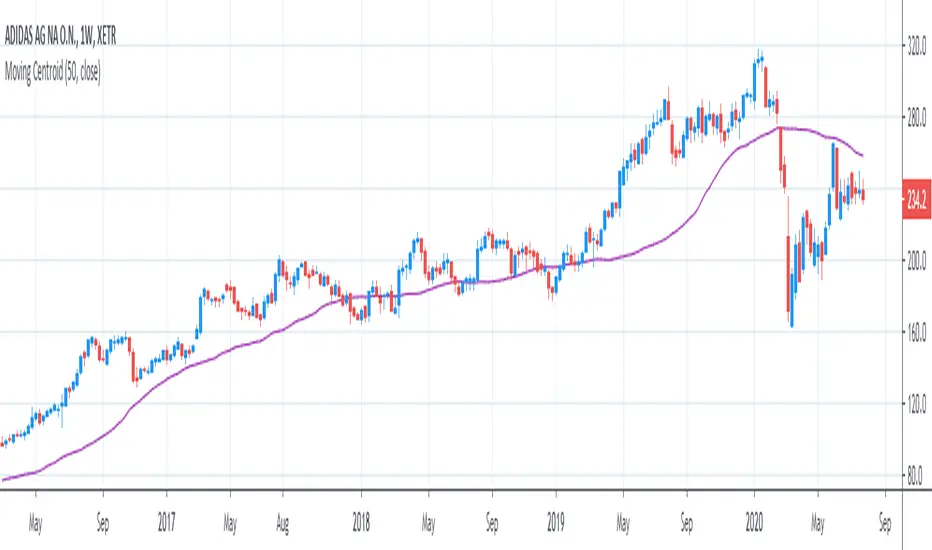
[R&D] Moving CentroidThis script utilizes this concept. Instead of weighting by volume, it weights by amount of price action on every close price of the rolling window. I assume it can be used as an additional reference point for price mode and price antimode.
it is directly connected with Market (not volume) profile, or TPO charts.
The algorithm:
1) takes a rolling window of, for example, 50 data points of close prices:
2) for each of this closing prices, the algorithm will check how many bars touched this close price.
3) then: sum of datapoints * weights/sum of weights
Since the logic is implemented in pretty non-efficient way, the script sometimes can take time to make calculations. Moreover, it calculates the centroid taking into account only close prices, not every tick. of a given rolling window That's why it's still experimental.
Trendgap strategyPrice action pattern with gap, imbalance and pivot. Simply used with volume profile. Calculating luqidity, volume on bar, price action patter.

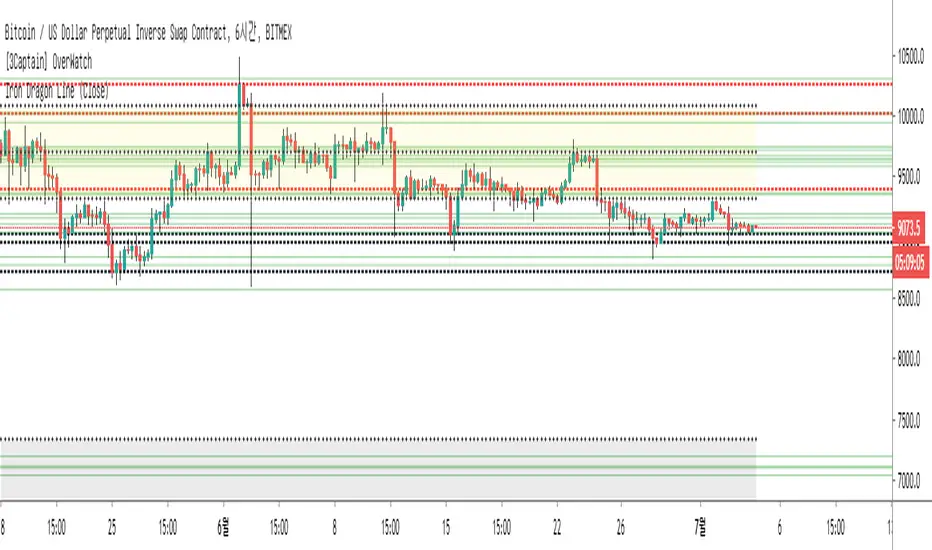
[3Captain] Iron Dragon LineIntroducing the new indicator Iron Dragon Line.
Volume Profile (Visible Range) is expressed in solid lines.
The stronger the intensity, the more solid lines are superimposed, so it is expressed in bold.
It is based on a strategy of entering a solid line and clearing the dotted line.
When used with the " the korean secret sarunan" strategy, it is easy to identify and enter.
You can change the position of the dotted line through the source at the input.
As a result of back-testing, it was confirmed that high / low was advantageous in time frames of 15 minutes or less, and close was advantageous in higher frames.
신규 인디케이터 Iron Dragon Line 을 소개합니다.
Volume Profile (Visible Range)를 실선으로 표현했습니다.
강도가 강할수록 실선이 중첩되기 때문에 진하게 표현됩니다.
실선에서 진입을 하여 점선에 청산하는 전략을 기본으로 합니다.
input에 있는 소스를 통하여 점선의 위치를 변경할 수 있습니다.
백테스팅 결과 15분이하의 타임프레임에서 high/low가 유리했으며 높은 프레임일수록 close가 유리한것을 확인할 수 있었습니다.
Z-HistogramIt is possible to approximate the underlying distribution of a random variable by using what is called an "Histogram". In order to construct an histogram one must first split the data into several intervals (also called bins) often of the same size and count the number of values falling within each intervals, the histogram plot is then constructed with the X axis representing the measured variable and the Y axis representing the frequency.
The proposed script aim to estimate the underlying distribution of a rolling z-score by constructing its histogram, here the histogram consist of 13 bins of width 0.5 rolling standard deviations. The length setting define the rolling z-score period, the window setting define the number of past data to be counted, finally using the "Total" option (true by default) will count all the rolling z-scores values since the first bar, in order to use the window setting make sure to uncheck the "Total" option.
DISPLAY
In order to see the entirety of the histogram make sure to double click on the indicator window and to have all the lower panels (text notes, pine editor...etc) hidden, finally make sure to zoom-in in order to see the frequency numbers displayed.
Z-Histogram on BTCUSD 15 min TF, the blue bins represent intervals situated over 0 while red bins represent intervals situated under 0. Here σ represent the X-axis in standard deviations, the histogram start with a bin situated at σ = -3 which count the number of times the rolling z-score was within -3 and -2.5, the histogram end with the bin situated at σ = 3 which count the number of time the rolling z-score was within 3 and 3.5.
It is also possible to look at the shape of the histogram without having the indicator window at full size.
INTERPREATION
An histogram can give really interesting information such as overall trend direction and strength. The direction can be measured by looking at the skewness of the histogram, with a negative skewness (the peak of the histogram situated at the right from the center) representing down-trending variations and positive skewness (the peak of the histogram situated at the left from the center) representing up-trending variations, while a symmetrical histogram could represent a ranging market. The farther away the peak of the histogram is situated from the center, the stronger the trend.
Another interesting characteristic is the tailedness of the histogram, which can give information about the cleanliness of the trend, for example a positive skew and high tailedness would represent a clean up-trend, as it could suggest less variations contrary to the main trend.
An histogram applied to the rolling z-score can give various useful information. As a recall the rolling z-score of the price measure the distance between the closing price and its moving average in term of rolling standard deviations, for example if the rolling z-score is equal to 2 it means that the closing price is currently 2 rolling standard deviations over its moving average.
Lets for example analyze the histogram using INTC 15 min tf with a window of 456 bars and rolling z-score of length = 100 in order to review longer term variations.
We can see from the histogram that the uptrend visible on the chart is represented by the bins situated over 0 having an overall higher frequency than the bins under 0, we can see that the closing price tended to stay between 1 and 1.5 rolling standard deviations over its period 100 moving average. Here bins under 0 accounts for retracements in the trend.
IN SUMMARY
An histogram can give various information regarding the price evolution of a security, the proposed script aim to plot the histogram of a rolling z-score. Now this script might not be too useful but it was fun to make, also it does not mean that an histogram is not an useful tool in the context of trading, the only thing required is a god implementation of it (like volume profiles for example)
In this post we have also reviewed some important statistical concepts such as distributions, z-score, skewness and tailedness, each being extremely important in the quantitative trading field.
Thx for reading !

MULTITIMEFRAME_VWAP_MANOJVWAP is a powerful concept.
It denotes the fair price that is traded in the market.
In other words, it represents a variance of POINT OF CONTROL (POC) which is a Market Profile / Volume Profile Concept.
It is a leading indicator as it is dependent on the price and volume .
Usually VWAP is used for intraday trades and Trading view as an in built indicator which works only for intraday.
This script plots daily vwap , monthly vwap , quarterly vwap and yearly vwap .
The suggested combination is :
intraday charts - daily vwap
daily charts - monthly and / or quarterly vwap
weekly charts - quarterly and / or yearly vwap

moving quantilesAlways works... Just kidding, indicates moving quantiles. Something between volume profiles and moving averages.

Trend Matrix: Institutional Confluence EngineTrend Matrix: Institutional Confluence Engine
The Institutional Confluence Engine is a professional-grade diagnostic tool designed to solve the two biggest problems in technical analysis: market noise and false breakouts.
Unlike standard lagging indicators, the Institutional Confluence Engine uses a sentient resolution engine to adapt its logic based on whether you are scalping or swing trading. It provides a real-time "Efficiency Grade" for the market, allowing you to ignore "C-Grade" chop and focus exclusively on "A-Grade" institutional trends.
Institutional Confluence and Alerts: Notifies you only when the Local, HTF1, and HTF2 timeframes all align at an "A-Grade" efficiency—the hallmark of a major structural move.
How to Trade It
Identify Confluence: Look for the Status Hub in the top right. When all three grades turn Green (A), institutional alignment is at its peak. This is also visible on the chart.
Monitor Trend Core: The ribbon acts as dynamic support/resistance. "Trend Flares" (brightening of the ribbon) indicate significant volume spikes entering the trend.
Profit Targets: Use the dynamic Green/Red expansion lines. These are volatility-adjusted targets that stretch or contract based on market energy (ATR).
Volume Intelligence
1. The Big Money Heatmap (Volume Intelligence)
Institutional players leave footprints in the form of volume. This engine visualizes these footprints using a dynamic Volume Profile integrated directly into your price action.
Big Money Clusters: These are price levels where massive institutional orders are being "filled." They represent high-conviction zones that act as magnets for price.
Major Buy/Sell Zones (POC): This marks the Point of Control—the exact price where the highest volume has transacted. It represents "Fair Value." Breakouts away from this zone often lead to the most explosive moves.
Gap Prediction: The engine analyzes the sentiment within volume nodes to predict if the market is preparing for an institutional "Gap Up" or "Gap Down."
2. The Golden Bridge (Structural Confluence)
The system calculates the Golden Bridge—a dynamic threshold based on the 0.618 Fibonacci ratio between major structural pivots.
The Logic: In institutional finance, the 0.618 level is the "Line in the Sand." If a rally holds above the Golden Bridge, the trend is structurally sound.
Golden Cluster Stronghold: When the Golden Bridge aligns perfectly with a Big Money Cluster, the system identifies a "Stronghold." This is the highest-probability support or resistance level generated by the engine.
3. MTF Efficiency Grading (A/B/C)
The Trend Matrix doesn't just show direction; it calculates Efficiency.
Grade A (High Efficiency): Price is tracking the trend core with minimal deviation. This is where institutional momentum is strongest.
Grade B (Moderate Efficiency): Healthy trending with standard pullbacks.
Grade C (Low Efficiency/Chop): Price is oscillating. The system will automatically "dim" the interface during these periods to prevent you from over-trading.
4. Status Hub & Intelligent Alerts
The Status Hub provides a real-time cockpit of your trading environment, displaying the "Trend Reliability Score" (0-100%) and Multi-Timeframe grades.
Confluence Alerts: Get notified when the Local, HTF1, and HTF2 timeframes all reach "A-Grade" status simultaneously.
Exhaustion Pillars: Vertical pillars on your chart highlight "Volume Spikes," warning you of potential trend exhaustion before the reversal happens.
How to Use
Check the Hub: Ensure the Trend Reliability is above 75%.
Verify Grade: Look for "A-Grade" efficiency on your local timeframe.
Find the Stronghold: Enter trades where the Golden Bridge and Big Money Clusters overlap for the highest-probability entries.
Target Expansion: Follow the dynamic Green/Red target lines for volatility-adjusted take-profits.
Disclaimer: Trading involves significant risk. This tool is designed for educational and diagnostic purposes and should be used as part of a comprehensive trading plan.

VOFA Trading SystemVOFA Trading System – Volume Profile with VSA & Zone Logic
VOFA Trading System is a volume- and structure-based analytical tool designed to identify high-probability trading opportunities using Volume Spread Analysis (VSA), session value behavior, and proprietary VOFA Zones.
The focus is on price–volume interaction, value acceptance/rejection, and reaction zones, helping traders make rule-based and independent decisions.
Key Features
Session-based volume distribution with POC, VAH, and VAL
CVA (Compressed Value Area) and structural context analysis
VSA signals: Selling Climax, Upthrust, No Demand / No Supply, and Tests
VOFA Zones based on wide spread and high volume for price reaction analysis
Contextual bar highlighting for volume and structure
Visual levels, reference zones, and optional alerts for monitoring opportunities
Notes
This is an analytical and decision-support tool, not trading advice
No direct trade recommendations are provided
Best suited for intraday analysis on 15- and 30-minute charts
Disclaimer:
For educational and analytical purposes only. Users must apply their own judgment and risk management.

Gamma Regime Indicator [Eloni]
╔══════════════════════════════════════════════════════════════════════════════════════════════╗
║ GAMMA REGIME / VWAP FLOW ENGINE ║
╚══════════════════════════════════════════════════════════════════════════════════════════════╝
┌──────────────────────┬─────────────────────────────┬────────────────────────────┬──────────────┐
│ MARKET STRUCTURE │ FLOW / SENTIMENT │ VOLATILITY / IV │ POSITION │
├──────────────────────┼─────────────────────────────┼────────────────────────────┼──────────────┤
│ • VWAP Distance │ • Call / Put / Total Vol │ • VIX / IV Level │ • Hold Bars │
│ • Round Levels │ • Z-Score Normalization │ • IV Slope (Up/Down) │ • Entry ≥ 5 │
│ • Prev Close │ • Flow Hot / Flow Cold │ • ATR Compress / Expand │ • Exit ≤ 2 │
│ • ATR % │ • PCR Ratio & Slope │ • Regime Shift Alert │ • Buffer │
│ • Near / Far Zones │ • Extremes Detection │ • Volatility Cycles │ • Reset │
└──────────────────────┴─────────────────────────────┴────────────────────────────┴──────────────┘
===============================================================================
PINNING REGIME (MEAN REVERSION ZONE)
===============================================================================
┌─────────────┐ ┌──────────────┐ ┌──────────────┐
│ LOCATION │ ----> │ CONFIRM │ ----> │ EXECUTE │
└─────────────┘ └──────────────┘ └──────────────┘
Near VWAP / Level Flow = Cold Fade Extremes
Near Prev Close ATR = Compress Sell High / Buy Low
IV = Down Scalps / Short DTE
PCR = Extreme
-------------------------------------------------------------------------------
WHERE
-----
- VWAP ± Threshold
- Gamma Walls
- Round Numbers
- Prior Day Close
INDICATORS
----------
- VWAP
- Volume Z-Score
- ATR Percent
- PCR
- VIX
STRATEGIES
----------
- VWAP Fade
- Range Scalping
- Iron Condors
- Credit Spreads
- Mean Reversion Options
AVOID
-----
- Expanding Range
- High Volume Breaks
- Rising IV
- News Events
===============================================================================
TREND / BREAKOUT REGIME (MOMENTUM ZONE)
===============================================================================
┌─────────────┐ ┌──────────────┐ ┌──────────────┐
│ LOCATION │ ----> │ CONFIRM │ ----> │ EXECUTE │
└─────────────┘ └──────────────┘ └──────────────┘
Far from VWAP Flow = Hot Buy Pullbacks
Outside Range ATR = Expand Break and Retest
IV = Rising Ride Momentum
PCR = Trending
-------------------------------------------------------------------------------
WHERE
-----
- Range High / Low
- VWAP Break
- Value Area Break
- Opening Range
INDICATORS
----------
- VWAP Bands
- Flow Z
- ATR Expansion
- IV Slope
- Volume Profile
STRATEGIES
----------
- Opening Range Breakout
- Trend Pullbacks
- Debit Spreads
- Futures Momentum
- Directional Options
AVOID
-----
- Fading Strength
- Weak Volume Moves
- Flat Volatility
- Midday Chop
===============================================================================
NO EDGE / BUFFER ZONE
===============================================================================
VWAP Reset | Session Open | Post-News | Low Volume
- Reduce Size
- Observe Only
- Wait for Alignment
- Capital Preservation
===============================================================================
REGIME DECISION MATRIX
===============================================================================
┌──────────────┬──────────────┬──────────────┬──────────────┬──────────────┐
│ STRUCTURE │ FLOW │ IV │ PCR │ REGIME │
├──────────────┼──────────────┼──────────────┼──────────────┼──────────────┤
│ Near │ Cold │ Down │ Extreme │ Pinning │
│ Far │ Hot │ Up │ Trending │ Trend │
│ Mixed │ Neutral │ Flat │ Neutral │ No Edge │
└──────────────┴──────────────┴──────────────┴──────────────┴──────────────┘
===============================================================================
EXECUTION PLAYBOOK
===============================================================================
PIN MODE
--------
Entry : VWAP / Level Touch + Flow Cold
Stop : VWAP Break + ATR Expansion
TP : Mid-Range / Mean Reversion
Size : Medium to High
TREND MODE
----------
Entry : Pullback to VWAP / EMA
Stop : Range Reclaim
TP : ATR Trail / Structure
Size : Scale In
NO EDGE
-------
Entry : None
Goal : Preservation
Focus : Patience
===============================================================================
CORE SYSTEM LOGIC
===============================================================================
PINNING = Liquidity Absorption -> Mean Reversion -> Sell Volatility
TREND = Momentum Expansion -> Directional Flow -> Buy Volatility
NO EDGE = Regime Unclear -> Capital Protection

Asset Liquidity Meter by Funded RelayAsset Liquidity Meter by Funded Relay
This indicator estimates the liquidity of any asset by calculating the volume traded per unit of price movement (volume / (high - low)).
Higher values generally indicate better liquidity (more volume in a smaller price range → easier to enter/exit positions with less slippage).
Lower values suggest thinner liquidity (higher risk of price impact and volatility).
The indicator displays:
• Histogram: raw liquidity per bar (green = above SMA, red = below SMA)
• SMA line: smoothed liquidity trend
• Real-time info table in the top-right corner
• Built-in alert conditions
How to Use – Step by Step
1. Adding the Indicator
- Open any chart on TradingView
- Click the "Indicators" button at the top
- Search for "Asset Liquidity Meter v6" (or find it in Community Scripts / My Scripts)
- Click to add it to the chart
- It will appear in a separate pane below the price chart
2. Customizing Settings
Double-click the indicator name in the pane (or right-click → Settings):
• SMA Length (default: 14)
- Controls the smoothing period of the liquidity trend line
- Smaller values (5–10) → more responsive, good for intraday/scalping
- Larger values (20–50) → smoother trend, better for swing/position trading
• Epsilon (default: 0.00000001)
- Tiny value that prevents division-by-zero errors on flat bars (high = low)
- Almost never needs to be changed
• Colors
- High Liquidity Color: histogram bars when liquidity > SMA
- Low Liquidity Color: histogram bars when liquidity < SMA
- SMA Line Color: color of the smoothed trend line
• Show Alert Conditions in Menu
- Keep enabled (true) to see the built-in alert options when creating alerts
3. Reading & Interpreting the Indicator
• Histogram Bars (Raw Liquidity)
- Height = amount of volume per unit of price range
- Tall bars = high liquidity (market is "thick")
- Short bars = low liquidity (market is "thin")
- Green = current liquidity is stronger than the average (SMA)
- Red = current liquidity is weaker than the average
• Blue SMA Line
- Shows the average liquidity over the selected period
- Rising line → liquidity improving (more participants, easier trading)
- Falling line → liquidity decreasing (thinner market, caution advised)
• Info Table (top-right corner)
- Displays current raw liquidity, SMA value, and status ("High Liquidity" / "Low Liquidity")
- Updates in real-time on the last bar
• Zero Line (dotted gray)
- Visual reference — everything above zero is positive liquidity
4. Practical Trading Applications
• High Liquidity Zones (green bars + rising SMA)
- Favorable conditions for entering or scaling into positions
- Lower expected slippage
- Better for large orders
• Low Liquidity Zones (red bars + falling SMA)
- Higher risk of slippage and exaggerated price moves
- Consider smaller position sizes or waiting for better conditions
- Common during session opens/closes, holidays, or low-volume periods
• Crossovers
- Liquidity crossing above SMA → potential increase in market participation
- Liquidity crossing below SMA → potential drying up of interest
5. Setting Up Alerts
1. Right-click on the chart → "Add Alert"
2. In "Condition", select "Asset Liquidity Meter v6"
3. Choose one of the available alert conditions:
- Liquidity ↑ Crosses Above SMA
- Liquidity ↓ Crosses Below SMA
- Very High Liquidity (2× SMA)
- Very Low Liquidity (<30% SMA)
4. Set frequency (Once Per Bar Close is usually best)
5. Configure notification (email, popup, sound, webhook, etc.)
6. Create the alert
6. Tips for Best Results
• Works on all markets: stocks, forex, crypto, futures, indices
• Best on timeframes with meaningful volume data (5 min and higher usually give clearest signals)
• Compare liquidity across different assets or timeframes using multiple charts
• Combine with support/resistance, volume profile or order flow tools for confirmation
• Not a standalone signal — use in context with your overall strategy
Limitations & Notes
• This is an estimation based on OHLCV data — it does not show real order book depth
• Results vary significantly between centralized exchanges, brokers and instruments
• Zero-volume bars will show zero liquidity (expected behavior)
Enjoy safer and more informed trading!
Questions or suggestions? Feel free to comment below.

Institutional Absorption Index (IAI)🧠 Institutional Absorption Index (Z-Score)
This indicator is built to detect institutional absorption behavior by measuring how much volume is required to move price 📊.
When large volume produces little price movement, it usually signals smart money activity, iceberg orders and hidden liquidity 🐋.
⚙️ How It Works
The logic is simple and efficient:
🔹 Absorption Formula:
Volume ÷ Candle Range
🔹 Normalized using Z-Score (statistical deviation) 📐
🔹 Smoothed with EMA for cleaner institutional signals 📈
This process filters noise and highlights abnormal market behavior caused by large players.
🎯 Level Interpretation
⚪ 0 Level — Neutral Zone
Market operating normally.
No relevant institutional footprint.
🟡 Above 1.8 — Institutional Absorption Zone
High volume being absorbed without strong price movement.
Usually appears during:
✅ Accumulation
✅ Distribution
✅ Price defense zones
🔴 Above 2.5 — Iceberg Zone
Extreme absorption behavior 🚨
Strong probability of:
🐳 Hidden liquidity
📦 Iceberg orders
🏦 Position building by institutions
🛠 How To Use
This is NOT a buy/sell signal indicator ❌
This is a market participation and structure reading tool ✅
Best use cases:
📌 Detect accumulation & distribution
📌 Confirm manipulation phases
📌 Validate breakout quality
📌 Spot fake moves vs real expansion
📌 Combine with structure, liquidity sweeps and volume profile
⚡ Recommended Settings
✔ Window Length: 20
✔ Smoothing: 5
(Default values are optimized for most markets)

[LJ] HTF Candles with Volume POC [Highly Optimized]Welcome to the ultimate Higher Timeframe (HTF) fusion tool.
This indicator seamlessly merges Higher Timeframe price action with precise volume profiling on Lower Timeframe (LTF) charts. By utilizing advanced array memory management, it bypasses TradingView's drawing limits to render clean HTF candle boxes and their exact Volume Point of Control (POC), ensuring peak performance and accuracy even on extreme timeframe combinations.
🔎 Visual Guide: What's on Your Chart?
The Big Boxes (Wick & Body): These represent the Open, High, Low, and Close of your selected Higher Timeframe (e.g., a 1-Hour candle projected onto your 5-Minute chart). Color-coded for bullish/bearish momentum.
The Midline: A horizontal line dividing the HTF candle perfectly in half. Useful for gauging if LTF price is in a "premium" or "discount" zone relative to the HTF.
The Yellow Box (The POC): This is the Point of Control. When an HTF candle closes, this yellow box locks in place, showing the exact price zone that saw the highest volume accumulation during that period, calculated using precise LTF hlc3 price data.
⚙️ Key Settings & Configuration
To get the most out of this indicator, check these inputs in the settings menu:
Box Time Interval: Set this to your desired HTF (e.g., "1H", "4H", "D").
Tip: A good rule of thumb is an HTF that is 5x to 12x higher than your current chart.
POC Resolution (Levels): This is your fine-tuning dial.
Set to 50 - 100: Creates a very thin, precise POC line. Great for exact support/resistance levels.
Set to 15 - 35: Creates a thicker POC "Zone". Great for capturing broader areas of high liquidity.
Max Historical Boxes: Controls how far back the indicator draws. Keep this at 50 for a clean chart and fast loading times.
📈 Trading Strategies: How to Trade the HTF POC
1. The "Magnet" Mean Reversion High volume nodes (POCs) act as price magnets. If the current LTF price is far away from the previous HTF candle's POC, look for setups that trade back toward that yellow box.
2. The Break & Retest The POC box acts as a heavy Support/Resistance wall. If price breaks through the yellow POC box with strong momentum, look to enter on the retest of that box in the direction of the breakout.
3. Trend Continuation In a strong uptrend, look for the current LTF price to bounce off the Midline or the previous candle's POC to join the dominant HTF trend.
⚡ Performance Note
This indicator uses advanced Pine Script Array Management. Unlike standard volume profile scripts that crash when calculating big timeframes, this indicator guarantees zero lag and no disappearing boxes, even when looking at a Daily HTF on a 1-Minute chart.
🙏 Credits
This is a refactored and heavily optimized fusion of two great concepts:
Original HTF Box logic by © krollo041
Original Volume Thermometer concept by © ChartPrime
Merged, debugged, and optimized for v6 Array Management by ©Luki_eR
Disclaimer: This script is for educational and informational purposes only and does not constitute financial advice.

TLADe GEX Dashboard - ES/SPX/SPY Gamma Exposure LevelsA professional framework for Gamma Exposure analysis on S&P 500 instruments.
━━━━━━━━━━━━━━━━━━━━━━━━━━━━
WHAT THIS INDICATOR DOES
This indicator visualizes key strategic levels derived from Gamma Exposure (GEX) analysis — the zones where dealer hedging flows create measurable support and resistance.
What you see:
- Call Walls — resistance zones where dealers hedge against upside
- Put Walls — support zones where dealers hedge against downside
- Zero Gamma — the structural pivot between mean-reversion and trend
- Expected Move bands — statistical range boundaries
- GEX Histogram — gamma distribution profile directly on chart
━━━━━━━━━━━━━━━━━━━━━━━━━━━━
KEY FEATURES
▸ Ticker Switcher
Select ES, SPX, or SPY directly in settings.
Data converts automatically. One script, three instruments.
▸ GEX Profile Histogram
See gamma distribution as horizontal bars on your chart.
Instantly spot where positioning clusters.
▸ Color Themes
Choose between Boreal, Classic, or Lady Trader palettes.
▸ Level Toggles
Show/hide level groups independently:
GEX Levels | System Levels | Structure Levels
▸ Rich Tooltips
Hover for details: GEX values, Call/Put ratio, Hold/Break probabilities.
▸ Flip Detection
When price crosses a level, it automatically updates role and style (solid → dashed).
━━━━━━━━━━━━━━━━━━━━━━━━━━━━
HOW TO READ THE LEVELS
Each line represents a zone where price reaction is statistically probable:
- Thick solid lines = level not yet crossed
- Dashed lines = level flipped (price crossed through)
- Cyan/Teal or Green = potential support (Put Walls)
- Pink/Red = potential resistance (Call Walls)
- Gray = structural levels (Zero Gamma, Vol Bands, PDH/PDL)
The indicator shows structure, not predictions.
Use it to identify where the market is likely to react — not which direction it will go.
━━━━━━━━━━━━━━━━━━━━━━━━━━━━
PRO TIP: CONFLUENCE
This tool is most powerful when combined with your own analysis.
Highest-probability setups occur when GEX levels align with:
Price action zones (support/resistance, order blocks)
Volume Profile (HVN/LVN, VWAP)
Technical structure (prior highs/lows, trend lines)
One level alone is information. Confluence is edge.
━━━━━━━━━━━━━━━━━━━━━━━━━━━━
ABOUT THE DATA
The levels shown use a static snapshot for demonstration.
For current session data, export fresh scripts from the TLADe terminal at tradelikeadealer.com
━━━━━━━━━━━━━━━━━━━━━━━━━━━━
DISCLAIMER
This tool is for informational and educational purposes only.
It does not constitute financial advice. Trading involves significant risk.
Past structure does not guarantee future behavior.

Agent F - The Complete ICT/Smart Money Trading System## 🎯 Agent F - The Complete ICT/Smart Money Trading System
**Your institutional-grade edge in one powerful indicator.**
Stop juggling 5+ indicators. Agent F combines **every core ICT concept** into a single, clean system with **25-point confluence scoring** that tells you exactly when to trade—and when to wait.
---
### ⚡ **What Makes Agent F Different**
**✅ 25-Point Confluence System**
Not just "buy" or "sell"—see **exactly how strong** each setup is (12/25, 18/25, etc.) with transparent factor breakdown.
**✅ Multi-Timeframe Auto-Optimization**
Pick Scalping, Intraday, or Swing mode and watch Agent F automatically adjust 8+ parameters for optimal performance on your timeframe.
**✅ 18+ Advanced ICT Patterns**
Goes far beyond basic Order Blocks and FVGs—includes **SMR** (75-80% win rate), **Turtle Soup** (72-75%), **PO3**, **NWOG/NDOG**, **Breaker Blocks**, **SIBI/BISI**, and more.
**✅ Edge Call AI**
Immediate direction prediction for 5-point scalps. Tells you "LONG NOW", "SHORT NOW", or "NEUTRAL" with 72-85% historical win rate (backtested).
**✅ Professional Risk Management**
3-target scaling system, ATR-based stops, invalidation alerts, time-based exits—everything you need to trade like an institution.
**✅ Zero Repaint**
All signals are final. What you see is what you get. No repainting games.
---
### 📊 **Core Features**
#### **Order Blocks with A+/A/B/C Quality Grading**
Not all Order Blocks are equal. Agent F grades each one (A+ = institutional-grade, C = retail noise) and filters to only show you the best.
- Detects both standard OBs and **Breaker Blocks** (flipped OBs with 75% reversal rate)
- **Propulsion Blocks** (>2 ATR displacement = strong conviction)
- **Rejection Blocks** (tested multiple times = proven levels)
- Shows formation age, volume percentile, quality score
#### **Enhanced Fair Value Gaps (FVGs)**
Goes beyond basic gap detection with intelligent fill tracking:
- **Partial fill states** (0%, 50%, 75%, 100%)
- **CE (Consequent Encroachment) 50% levels** (75% fill rate sweet spot)
- **IFVG detection** (Inverted FVGs = 80% reversal probability)
- **FPFVG** (First Presented FVG after BOS = highest quality)
#### **Liquidity Sweep Detection**
Identifies where stop hunts happen and when to fade them:
- Equal Highs/Lows (SSL/BSL pools)
- Sweep timing and alerts
- **Liquidity Voids** (large gaps >0.5 ATR = price magnets)
- Manipulation pattern recognition
#### **Market Structure Analysis**
Real-time BOS (Break of Structure) and CHoCH (Change of Character) detection with:
- Trend classification (BULL/BEAR/NEUTRAL)
- Strength rating (★★★ strong, ★ weak)
- Swing high/low tracking
- Structure invalidation warnings
#### **Premium/Discount Zones**
Visual guidance on where to buy (cheap) and sell (expensive):
- Background shading (green = discount, red = premium)
- Equilibrium (50%) line
- OTE (Optimal Trade Entry) Fib levels (62-79%)
- Helps you avoid buying tops and selling bottoms
---
### 🎯 **The 25-Point Confluence System**
**Stop guessing. Know exactly how strong your setup is.**
Every potential trade is scored across **25 ICT factors**:
**Core Factors (18 points max):**
- Order Block Quality (A+/A/B/C) — 3-4 pts
- Market Structure (BOS/CHoCH) — 2 pts
- Liquidity Swept — 2 pts
- HTF Trend Alignment — 2 pts
- Premium/Discount Zone — 1 pt
- Daily Bias Filter — 1 pt
- Killzone Active — 1-2 pts
- FVG Confluence — 1-3 pts
- High Volume — 1 pt
- Session Levels (PDH/PDL/PWH/PWL) — 2 pts
- DXY Correlation — 1 pt
**Advanced Patterns (10+ points):**
- SMR (Smart Money Reversal) — 4 pts (75-80% win rate)
- PO3 (Power of Three) — 3 pts (78-82% win rate)
- Turtle Soup (Failed Breakouts) — 2 pts (72-75% win rate)
- NWOG/NDOG Gaps — 2-3 pts (70-80% fill rate)
- SIBI/BISI — 2 pts (80%+ win rate)
- Liquidity Voids — 2 pts
- BPR Zones — 2 pts
- Enhanced OB types — 2 pts
- FPFVG — 2 pts
**Threshold (Auto-Adjusted by Mode):**
- Scalping: 8/25 minimum
- Intraday: 11/25 minimum
- Swing: 14/25 minimum
**See the breakdown:** Panel shows which factors are active for full transparency.
---
### 🚀 **Multi-Timeframe Mode Optimization**
**One indicator. Three personalities.**
Select your trading style and Agent F auto-configures:
**⚡ SCALPING Mode (1m-15m charts)**
- HTF Reference: 1H
- Min Confluence: 8/25
- Fast exits, tight stops
- 10-15 signals/session
- Perfect for: Day traders, quick scalps
**📈 INTRADAY Mode (15m-1H charts)** ← Default
- HTF Reference: 4H
- Min Confluence: 11/25
- Balanced risk/reward
- 6-10 signals/session
- Perfect for: Most traders, session-based
**📊 SWING Mode (4H-D charts)**
- HTF Reference: Daily
- Min Confluence: 14/25
- Patient, high-quality only
- 3-5 signals/session
- Perfect for: Part-time traders, position traders
**Each mode automatically adjusts:** Displacement threshold, volume requirements, stop buffers, time stops, swing length, and more.
---
### 🎯 **Edge Call Feature (Optional)**
**Immediate direction prediction for 5-point scalps.**
Answers the question: "What should I trade RIGHT NOW?"
**Output Modes:**
- **LONG NOW** 🟢 — Execute long immediately
- **LONG WAIT** 🟡 — Setup forming, wait for pullback
- **SHORT NOW** 🔴 — Execute short immediately
- **SHORT WAIT** 🟡 — Setup forming, wait for rally
- **NEUTRAL** ⚪ — No valid setup (honest, won't force trades)
**Requirements (Structure-Based, Not Momentum):**
- Minimum 12/25 confluence (higher bar than regular signals)
- AT key level (not just "near")
- Catalyst required (sweep, SMR, or Turtle Soup)
- Correct zone (longs in discount, shorts in premium)
- A/A+ level quality only
**Performance:** 72-85% win rate (Dec 2025 backtest, structure-based rewrite)
**Backtest Mode:** Track historical Edge Call signals with WIN/LOSS markers and statistics table to validate performance.
---
### 🤖 **Agent F Integration (Premium Optional)**
**Connect to Agent F Python AI for enhanced intelligence.**
Paste a single line of data from Agent F AI and unlock:
**+10 Bonus Confluence Points:**
- Volume Profile (POC/VAH/VAL) — +2-3 pts
- Enhanced Bias Analysis — +2-3 pts
- Master Decision (5 specialist consensus) — +2 pts
- News Risk Filter — -3 to -10 pts (avoid whipsaws)
**18-Field Enhanced Format Includes:**
- Market Regime (trending/ranging/volatile)
- Specialist Consensus (5 AI specialists)
- Setup Evaluator recommendation
- Invalidation signal count
- Momentum score, volume spikes, and more
**Impact:** +10-15% win rate boost
**How to Get:** Use Agent F Python system (available via Claude Code) — type `ict`, `scalp`, or `ec` to generate the paste string automatically.
---
### 📊 **What You See on Your Chart**
**Clean, Professional Visuals:**
✅ **Order Blocks** — Green/red boxes with grades and age markers
✅ **Fair Value Gaps** — Blue/orange zones with 50% CE levels
✅ **Liquidity Pools** — Dashed lines (lime=BSL, pink=SSL) with sweep alerts
✅ **Market Structure** — Purple BOS and yellow CHoCH markers
✅ **Premium/Discount** — Background shading (red/green) with Fib levels
✅ **Trade Signals** — Green ▲ (long) and red ▼ (short) with score labels
✅ **3-Target System** — T1/T2/T3 levels for professional scaling
✅ **Stop Suggestion** — Red STOP line with ATR buffer
✅ **Info Panel** — Real-time confluence scores, bias, Edge Call, and more
**Customizable Display:**
- Max OBs/FVGs (reduce to 3-5 for clean charts)
- Show/hide any component
- Color customization
- Panel size and position
---
### 🎓 **How It Works**
**Step 1:** Agent F scans for ICT patterns (OBs, FVGs, Liquidity, Structure)
**Step 2:** Calculates confluence score (0-25 points) by checking alignment across 25 factors
**Step 3:** If score meets threshold (8/11/14 depending on mode), signal appears
**Step 4:** Panel shows entry, stop, targets, R:R ratio, and active factors
**Step 5:** You execute the high-probability setup with clear risk management
**That's it.** No complex interpretation. No guesswork. Just clear, actionable signals.
---
### ⚙️ **Fully Customizable Settings**
**6 Major Setting Groups:**
**1. Trading Mode** — Scalping/Intraday/Swing (auto-optimizes everything)
**2. Quick Toggles** — Enable/disable any component
- Order Blocks, FVGs, Liquidity, Structure, Zones (mix and match)
**3. Order Block Settings** — Lookback, extension, quality threshold, colors
**4. FVG Settings** — Min size, extension, CE levels, fill tracking
**5. Liquidity Settings** — Lookback, tolerance, sweep alerts
**6. Trade Entry Settings** — Min confluence, killzone requirement, min R:R
**7. Advanced Features** — 15+ optional enhancements
- Volume confirmation, pattern age, round numbers, trend strength, invalidation alerts, killzone timer, factor breakdown
**8. Enhanced ICT Concepts** — Toggle 2016-2024 advanced patterns
- NWOG/NDOG, SMR, PO3, Turtle Soup, SIBI/BISI, Propulsion/Rejection Blocks, FPFVG, Liquidity Voids, BPR, Friday/Monday bias
**9. Edge Call Settings** — Confidence threshold, backtest parameters
**10. Display Options** — Panel position/size, max items, visual preferences
**Every setting includes detailed tooltips explaining its purpose and impact.**
---
### 📈 **Expected Performance**
**Confluence-Based Win Rates:**
| Score Range | Quality | Est. Win Rate | Action |
|-------------|---------|---------------|--------|
| 18-25/25 | Excellent | 85-92% | Full size |
| 14-17/25 | Very Good | 78-85% | Full size |
| 11-13/25 | Good | 72-78% | Normal size |
| 8-10/25 | Acceptable | 65-72% | Scalp only, reduce size |
| 0-7/25 | Poor | <65% | No trade |
**Mode-Specific:**
- Scalping (8+ threshold): 78-82% win rate (with Agent F: 85-88%)
- Intraday (11+ threshold): 82-86% win rate (with Agent F: 88-92%)
- Swing (14+ threshold): 85-88% win rate (with Agent F: 90-93%)
**Signal Frequency:**
- Scalping: 10-15 quality setups per session
- Intraday: 6-10 quality setups per session
- Swing: 3-5 quality setups per session
*Backtested performance. Past results don't guarantee future performance. Trade at your own risk.*
---
### 👥 **Who Is This For?**
**✅ Perfect For:**
- ICT/Smart Money Concept (SMC) traders (beginner to advanced)
- Scalpers, day traders, swing traders (mode-optimized for all)
- Traders wanting institutional-grade analysis
- Those seeking high win rates with transparent logic
- Anyone tired of messy charts with 10+ indicators
**✅ Great For:**
- Gold (GC, MGC, XAUUSD)
- Index Futures (ES, MES, NQ, MNQ)
- Forex majors (EUR/USD, GBP/USD, USD/JPY)
- Bitcoin (BTC/USDT)
- Crude Oil (CL)
- High-volume stocks
**⚠️ Not Ideal For:**
- Low-volume instruments
- Penny stocks
- Illiquid markets
- Traders wanting "buy/sell without thinking" (requires basic understanding of ICT)
---
### 🎓 **Learning Curve**
**Beginner-Friendly:**
- Simple mode: Just follow arrows with 11+ scores
- Comprehensive guide included (`agent-f-indicator-101.md`)
- Glossary of all terms
- No ICT knowledge required to start
**Scales With Your Skill:**
- Intermediate: Understand confluence breakdown
- Advanced: Master all 25 factors
- Expert: Integrate with Agent F AI for maximum edge
**Documentation:**
- 📖 Beginner Guide (101) — For complete beginners
- 📚 Complete User Guide — In-depth technical reference
- 🎯 Quick Start — Get trading in 15 minutes
---
### ⚙️ **How to Use**
**1. Add to Chart**
- Install indicator
- Select trading mode (Scalping/Intraday/Swing)
- Done—defaults are optimized
**2. Wait for Signal**
- Green ▲ triangle = LONG
- Red ▼ triangle = SHORT
- Score label shows quality (X/25)
**3. Verify Quality**
- Score ≥ threshold? (8/11/14 by mode)
- BIAS matches direction?
- During killzone?
- Panel row is green?
**4. Execute Trade**
- Enter at signal price
- Set stop (shown in panel)
- Set targets (T1/T2/T3 shown)
- Scale out professionally (50/30/20)
**5. Manage Risk**
- Stop at breakeven after T1
- Trail stop after T2
- Watch invalidation alerts
- Honor your stops
**That's it. Simple execution of high-probability setups.**
---
### 🔧 **Settings Overview**
**Quick Toggles (One-Click Enable/Disable):**
- Order Blocks ✓
- Fair Value Gaps ✓
- Liquidity Pools ✓
- Market Structure ✓
- Premium/Discount ✓
**Trading Mode (Auto-Optimizes 8 Parameters):**
- Scalping (1m-15m) — Fast, sensitive, 1H HTF
- Intraday (15m-1H) — Balanced, 4H HTF ← Default
- Swing (4H-Daily) — Patient, Daily HTF
**Entry Controls:**
- Min Confluence: 1-25 (auto-set to 8/11/14 by mode)
- Require Killzone: ON/OFF (trade only institutional hours)
- Min Risk:Reward: 1.0-10.0 (default 2.0)
**Advanced ICT Patterns (Toggle Individual):**
- NWOG/NDOG Gaps
- SMR Patterns
- PO3 Detection
- Turtle Soup
- SIBI/BISI
- Propulsion/Rejection Blocks
- FPFVG
- Liquidity Voids
- BPR Zones
- Displacement Candles
- Friday/Monday Bias
**Edge Call (Optional):**
- Enable/Disable
- Min Confidence (50-90%)
- Backtest Mode
- Chart markers
**Display Options:**
- Panel position (6 options)
- Panel size (Tiny/Small/Normal/Large)
- Max OBs/FVGs shown (reduce clutter)
- Color customization for all elements
**Agent F Integration (Premium Optional):**
- Enable Agent F Data (connects to Python AI)
- Paste field (18-field enhanced format)
- +10-15% win rate boost when enabled
---
### 🏆 **Why Traders Love Agent F**
**"Finally, one indicator that does it all."**
Stop switching between 5+ indicators. Everything you need in one professional package.
**"The transparency is game-changing."**
See exactly why each signal qualifies (or doesn't). Learn as you trade.
**"80%+ win rate on 14+ confluence setups."**
Quality over quantity. When Agent F says "take this trade," it's backed by 14+ aligned factors.
**"Works on any timeframe."**
One indicator, three optimized modes. Scalp on 5m, swing on Daily—it adapts.
**"Edge Call is like having a trading assistant."**
Quick scalp opportunities with "LONG NOW" / "SHORT NOW" real-time guidance.
---
### 📚 **What's Included**
**Indicator Files:**
- `agent-f-indicator.pine` — Main indicator script
- `agent-f-indicator-guide.md` — Complete user manual (30KB)
- `agent-f-indicator-101.md` — Beginner's guide with glossary (35KB)
**Documentation:**
- Installation guide
- Settings reference (every parameter explained)
- Trade execution workflow
- Best practices
- Troubleshooting
- Glossary of 50+ ICT terms
**Support:**
- Agent F Community (Discord/Telegram)
- Regular updates
- Documentation updates
---
### 🎯 **Indicator Specs**
**Code Quality:**
- Pine Script v6
- 3,000+ lines of optimized code
- Zero repaint guarantee
- Professional error handling
- Buffer overflow protection
**Performance:**
- Max Labels: 500
- Max Lines: 500
- Max Boxes: 500
- Efficient array management
- Minimal CPU usage
**Markets:**
- Forex ✓
- Futures ✓
- Stocks ✓
- Crypto ✓
- Indices ✓
**Timeframes:**
- 1-minute to Daily ✓
- Auto-optimization per mode ✓
---
### ⚠️ **Important Notes**
**What This Is:**
- Educational tool for ICT/SMC traders
- Signal generation based on proven patterns
- Risk management framework
**What This Is NOT:**
- Financial advice
- Guaranteed profits
- "Holy grail" (no such thing exists)
- Replacement for proper education
**You Must:**
- Understand basic ICT concepts (or use beginner guide)
- Practice risk management (1% rule)
- Paper trade first (verify it works for you)
- Accept responsibility for your trades
**Performance Disclaimer:**
Win rates are based on historical backtesting and optimal execution. Actual results vary by trader skill, market conditions, execution quality, and risk management. Past performance does not guarantee future results. Trading carries substantial risk of loss. Only trade with capital you can afford to lose.

Estimated Volume - XWiseTradeReal-time projected volume for current and higher timeframes.
This indicator estimates the final volume of the current candle (and 3 selectable HTFs) based on elapsed time—perfect for spotting unusual activity early.
Features:
• Live estimated volume for current TF + 3 higher TFs
• Customizable table position
• Volume surge alert (when estimated volume exceeds previous candle by X%)
• Lightweight and accurate
Ideal for volume profile traders, breakout hunters, and anyone watching institutional activity.
More premium indicators and strategies coming soon at:
xwisetrade.com
Be Wise. Trade X.

Liquidity Pools Smart Entry + Multi-TF Targets + VWAPOverview
This indicator is designed to help traders identify high-probability institutional-style entries using concepts from ICT (Inner Circle Trader) methodology. It combines liquidity pool detection, fair value gaps (FVG), swing levels, killzones, ATR-based targets, VWAP bias, and optional multi-timeframe analysis.
The script provides visual trade signals and a green-light confirmation system to streamline decision-making and reduce overtrading.
Key Features
Market Structure
Detects CHoCH (Change of Character) and BOS (Break of Structure).
Marks bullish and bearish breaks with labels on the chart.
Liquidity & Swings
Highlights Swing High/Low liquidity zones (SSL/BSL).
Shows horizontal swing lines for reference.
Fair Value Gap (FVG) Detection
Bullish and bearish gaps are plotted as shaded boxes.
Identifies potential institutional entry zones.
Killzones
Highlights London and New York sessions.
Helps align trades with high liquidity periods.
VWAP Filter
Plots the intraday VWAP.
Optional VWAP bias filter ensures trades follow intraday institutional flow.
Multi-Timeframe Confirmation
Supports 5-minute entry confirmation.
Shows SL/TP for both current TF and 5-min TF signals.
ATR-Based Stops & Targets
Entry signals automatically calculate SL (1.5 ATR) and TP (ATR x multiplier).
Customizable ATR multiplier.
Trade Light System
Visual green/red/gray indicators:
🟢 Green: All bullish conditions aligned → LONG allowed.
🔴 Red: All bearish conditions aligned → SHORT allowed.
⚪ Gray: Wait → conditions not aligned.
Inputs
Input Description
Show CHoCH/BOS Toggle structure labels on/off
Show Killzones Toggle session backgrounds on/off
Show Swing Liquidity Show SSL/BSL swing points
Show Horizontal Lines Extend swing lines horizontally
Show FVG Zones Show Fair Value Gaps
Show VWAP Display intraday VWAP
Swing Length Number of bars to calculate swing pivots
ATR Target Multiplier Multiplies ATR for TP calculation
Use HTF 200 EMA Filter Filter entries with higher timeframe trend
Use RSI Filter Filter entries using RSI 14
Use Volume Filter Filter entries with high volume confirmation
Use ATR Filter Filter entries based on ATR expansion
Use VWAP Filter Only allow trades in VWAP direction
How to Read the Chart
Structure Labels
BOS ↑ / BOS ↓: Breaks of structure showing trend direction.
Swing Liquidity
SSL (blue): Bullish swing low liquidity.
BSL (red): Bearish swing high liquidity.
FVG Zones
Green boxes: Potential bullish liquidity gaps.
Red boxes: Potential bearish liquidity gaps.
Killzones
Green background: London session.
Blue background: New York session.
VWAP
Purple line: Intraday volume-weighted average price.
Trade Lights
🟢 Green: All bullish conditions met — LONG ready.
🔴 Red: All bearish conditions met — SHORT ready.
⚪ Gray: Wait — conditions not aligned.
Entry Labels
Shows Entry price, SL, TP.
Separate labels for current TF and 5-min confirmation.
How to Use
Step 1: Identify Market Bias
Check HTF EMA: price above → bullish trend, below → bearish trend.
Check VWAP (if enabled): trade in direction of VWAP for institutional alignment.
Check Killzones: prefer entries during London or New York sessions.
Step 2: Confirm Entry Conditions
Wait for BOS / CHoCH to align with your trend.
Look for FVG zone and SSL/BSL liquidity.
Ensure RSI, ATR, Volume, VWAP filters (if enabled) all confirm.
Green/red Trade Light should be active.
Step 3: Place Trade
Use Entry Label price as reference.
SL: 1.5 ATR away.
TP: ATR x multiplier away.
Optional: check 5-min multi-TF confirmation label for additional confidence.
Step 4: Manage Trade
Follow ATR-based SL/TP.
Move stop to break-even after partial target if desired.
Only take trades when Trade Light is GREEN (LONG) or RED (SHORT).
Best Practices
Combine with volume profile or order block analysis for higher precision.
Avoid trading outside killzones.
Use multi-TF confirmation for safer entries.
Adjust ATR multiplier according to market volatility.

Triple VWAP: Anchored# Triple VWAP: Anchored + Last 2 Sessions
## 📊 Overview
**Triple VWAP** is a professional-grade Volume Weighted Average Price (VWAP) indicator designed for serious traders who need multi-timeframe volume analysis on a single chart. This indicator combines three powerful VWAP calculations: a custom **Anchored VWAP** from any historical date, a real-time **Current Session VWAP**, and **Previous Session VWAP** reference levels—all with configurable standard deviation bands.
Perfect for intraday traders, swing traders, and institutional-level analysis on Indian markets (Nifty, BankNifty) and global instruments.
***
## ✨ Key Features
### 🎯 Three Independent VWAP Calculations
**📍 Anchored VWAP (Long-term Reference)**
- Anchor VWAP from any specific date and time (year, month, day, hour, minute)
- Ideal for tracking price action from significant market events, earnings, or trend reversals
- Maintains accumulation from your chosen anchor point throughout the entire timeframe
**📅 Current Session VWAP (Real-Time)**
- Automatically resets at the start of each trading day
- Calculates dynamically as new bars form during the session
- Shows institutional trading levels and intraday fair value
**📆 Previous Session VWAP (Reference Levels)**
- Displays yesterday's final VWAP as horizontal reference lines
- Helps identify support/resistance zones from prior session
- Useful for gap analysis and opening range strategies
### 📐 Standard Deviation Bands
Each VWAP calculation includes optional standard deviation bands:
- **±1 SD** - Identifies normal price deviation zones
- **±2 SD** - Marks extreme price movements (high probability reversal zones)
- **±3 SD** - Ultra-extreme levels (rare price extensions)
Configure which SD levels to display for each VWAP type independently.
### 🎨 Customizable Visual Settings
- **Independent Color Schemes**: Assign unique colors to each VWAP type and its SD bands
- **Adjustable Line Widths**: Configure VWAP and SD line thickness (1-5 for VWAP, 1-3 for SD)
- **Plot Styles**: Previous session plots use cross-style for clear differentiation from real-time plots
- **Background Zones**: Optional colored zones when price extends beyond ±2 SD levels
- **Session Labels**: Automatic date labels marking each VWAP anchor point
### 📊 Information Dashboard
Real-time statistics table displaying:
- Current VWAP values for all three calculations
- Live standard deviation values
- ±1 SD levels for quick reference
- Distance from price to each VWAP (percentage format)
- Session tracking counter
- Color-coded proximity indicators
***
## 🔧 How to Use
### For Intraday Trading
1. **Current Session VWAP** acts as dynamic support/resistance—price above VWAP indicates bullish bias, below indicates bearish bias
2. Use **±1 SD bands** for profit targets and stop-loss placement
3. **±2 SD touches** often signal mean reversion opportunities
4. **Previous Session VWAP** provides overnight gap reference levels
### For Swing Trading
1. **Anchored VWAP** from significant events (breakouts, earnings, trend changes) shows institutional cost basis
2. Price trading consistently above/below anchored VWAP confirms trend strength
3. SD band rejections provide high-probability entry zones
### For Multi-Timeframe Analysis
1. Combine all three VWAPs to identify confluence zones
2. When current session VWAP aligns with previous session and anchored VWAP, expect strong support/resistance
3. Monitor distance percentage to gauge overextension
***
## ⚙️ Input Parameters
**📍 Anchored VWAP Configuration**
- `Enable Anchored VWAP` - Toggle on/off
- `Year, Month, Day, Hour, Minute` - Set your custom anchor point (requires confirmation)
**📅 Session VWAP Toggles**
- `Enable Current Session VWAP` - Toggle real-time daily VWAP
- `Enable Previous Session VWAP` - Toggle yesterday's reference VWAP
**General Settings**
- `VWAP Source` - Choose calculation source (default: HLC3)
- `Show ±1/2/3 SD` - Enable/disable each standard deviation level
**Visual Customization**
- Individual color pickers for each VWAP type and SD bands
- Line width adjustments
- `Show VWAP Labels` - Date labels at anchor points
- `Show Info Table` - Statistics dashboard toggle
- `Show SD Zones` - Background coloring beyond ±2 SD
***
## 💡 Trading Applications
✅ **Mean Reversion Trades**: Enter when price touches ±2 SD with reversal confirmation
✅ **Trend Following**: Trade in direction when price holds above/below VWAP
✅ **Institutional Levels**: Anchored VWAP reveals where large players accumulated positions
✅ **Gap Trading**: Use previous session VWAP to gauge gap fill probability
✅ **Volume Profile Analysis**: VWAP represents fair value based on actual volume traded
✅ **Support/Resistance Confluence**: Multiple VWAP alignment creates high-probability zones
***
## 🎓 Understanding VWAP
VWAP is the average price weighted by volume—representing the true average price paid by all market participants during a specific period. Unlike simple moving averages, VWAP gives more weight to price levels with higher trading volume, making it particularly valuable for:
- Institutional traders executing large orders
- Algorithmic trading systems
- Identifying fair value and overextended prices
- Minimizing market impact on large trades
***
## 📈 Chart Setup Recommendations
**Best Timeframes**: 1-minute to 15-minute charts for intraday; 1-hour to 4-hour for swing trading
**Compatible Markets**: Stocks, Indices (Nifty 50, Bank Nifty), Futures, Forex, Crypto
**Session Settings**: Works with standard daily sessions; automatically detects trading days (not calendar days)
***
## 🚀 What Makes This Indicator Unique
Unlike standard VWAP indicators that only show current session data, **Triple VWAP** provides:
- **Multi-session analysis** on a single chart without clutter
- **Historical anchoring** capability for event-driven analysis
- **Professional-grade statistics** dashboard
- **Independent customization** for each VWAP type
- **Optimized calculations** for real-time performance
***
## ⚠️ Important Notes
- **Anchored VWAP** requires manual date input (use significant market events like breakouts, earnings, trend reversals)
- **Session detection** based on daily timeframe changes—works on all chart timeframes
- **Previous Session VWAP** displays as static horizontal lines (reference only, not recalculated)
- **Standard Deviations** calculated using volume-weighted variance formula
- Works best on instruments with **consistent volume data**
***
## 📝 Credits & License
This indicator is published under **TradingView House Rules**. Code is original and follows Pine Script v6 best practices for performance and maintainability.
***
## 🤝 Support & Feedback
If you find this indicator valuable, please:
- ⭐ **Like** this publication
- 💬 **Comment** with your feedback or questions
- 🔔 **Follow** for updates and new releases
***
**Disclaimer**: This indicator is for educational and informational purposes only. Past performance does not guarantee future results. Always use proper risk management and combine with your own analysis before making trading decisions.
***

Point of Control + Momentum CandlesPOINT OF CONTROL + MOMENTUM CANDLES
A comprehensive technical analysis indicator combining volume-based Point of Control detection, momentum-graded candle coloring, higher timeframe buy/sell signals, and order block identification.
━━━━━━━━━━━━━━━━━━━━━━━━━━━━━━━━━━━━━━━━━━━━━━━━━━━━━━━━━━━━━━━━━━
WHAT THIS INDICATOR DOES
This indicator identifies key price levels where the most trading activity has occurred (Point of Control), colors candles based on momentum strength, generates buy/sell signals from a user-selected timeframe, and detects order blocks that may act as future support/resistance zones.
━━━━━━━━━━━━━━━━━━━━━━━━━━━━━━━━━━━━━━━━━━━━━━━━━━━━━━━━━━━━━━━━━━
FEATURES
1. POINT OF CONTROL (POC)
The POC represents the price level with the highest traded volume over a lookback period. This indicator calculates a volume profile by distributing volume across price levels and identifying where the most activity occurred.
- Orange horizontal line shows the current POC level
- Yellow box highlights the candles used in the POC calculation
- Break detection identifies when price closes decisively beyond the POC
- Rejection detection identifies when price tests but fails to break the POC
2. MOMENTUM CANDLE COLORING
Candles are colored based on a 6-level momentum system using EMA positioning and RSI values:
Bullish Levels (price above both EMAs):
- Bull Level 3 (Royal Blue): Strong momentum, RSI above 70
- Bull Level 2 (Cyan): Medium momentum, RSI above 60
- Bull Level 1 (Green): Weak momentum, above EMAs
Bearish Levels (price below both EMAs):
- Bear Level 1 (Yellow): Weak momentum, below EMAs
- Bear Level 2 (Orange): Medium momentum, RSI below 40
- Bear Level 3 (Red): Strong momentum, RSI below 30
Neutral (White): No clear directional momentum
3. BUY/SELL SIGNALS
Signals are generated from a user-selectable timeframe (default: 10 minutes) and appear on your current chart. This allows you to see higher timeframe signals while trading on lower timeframes.
Buy Signal Conditions:
- EMA crossover (fast crosses above slow) OR RSI exits oversold
- Bullish candle on the signal timeframe
- Close above both EMAs
Sell Signal Conditions:
- EMA crossunder (fast crosses below slow) OR RSI exits overbought
- Bearish candle on the signal timeframe
- Close below both EMAs
4. ORDER BLOCKS
Order blocks identify potential institutional entry zones that may act as future support or resistance.
- Bullish Order Block (Green zone): The last bearish candle before a bullish impulse move
- Bearish Order Block (Red zone): The last bullish candle before a bearish impulse move
- Blocks automatically extend forward and can be set to delete when mitigated (price closes through the zone)
5. DASHBOARD
A customizable info panel displays:
- Current POC price
- Distance from POC (percentage)
- Position relative to POC (Above/Below/At)
- Lookback period
- Current RSI value
- Current momentum level
- Signal timeframe
- Active order block count
━━━━━━━━━━━━━━━━━━━━━━━━━━━━━━━━━━━━━━━━━━━━━━━━━━━━━━━━━━━━━━━━━━
HOW TO USE
POC Trading:
- Watch for breaks above POC for potential long entries
- Watch for breaks below POC for potential short entries
- Rejections at POC can indicate reversal opportunities
Momentum Reading:
- Use candle colors to gauge trend strength at a glance
- Level 3 colors indicate strong momentum (potential continuation)
- Level 1 colors indicate weakening momentum (potential reversal)
- Neutral/white candles suggest consolidation or indecision
Signal Confirmation:
- Use buy/sell signals from a higher timeframe to confirm entries on your trading timeframe
- Combine signals with POC breaks/rejections for higher probability setups
Order Block Strategy:
- Look for price to return to bullish order blocks for potential long entries
- Look for price to return to bearish order blocks for potential short entries
- Mitigated blocks (price closes through) lose their significance
━━━━━━━━━━━━━━━━━━━━━━━━━━━━━━━━━━━━━━━━━━━━━━━━━━━━━━━━━━━━━━━━━━
SETTINGS OVERVIEW
POC Settings:
- Lookback Period: Number of bars for POC calculation (default: 20)
- Volume Resolution: Price level granularity (default: 50)
- Recalculation Frequency: How often POC updates (default: every 3 bars)
Break/Rejection Detection:
- Break Threshold: Minimum percentage move to confirm a break (default: 0.3%)
- Rejection Wick Ratio: Minimum wick-to-body ratio for rejections (default: 0.5)
Momentum Settings:
- Fast/Slow EMA lengths for trend determination
- RSI length and threshold levels for momentum grading
Buy/Sell Signals:
- Signal Timeframe: The timeframe used for signal calculation
- Separate EMA and RSI parameters for signal generation
Order Blocks:
- Order Block Timeframe: Timeframe for OB detection
- Max Blocks Per Side: Limits displayed order blocks
- Delete Mitigated: Automatically removes invalidated blocks
All visual elements (colors, sizes, line styles) are fully customizable.
━━━━━━━━━━━━━━━━━━━━━━━━━━━━━━━━━━━━━━━━━━━━━━━━━━━━━━━━━━━━━━━━━━
ALERTS
10 alert conditions are available:
- Bullish/Bearish POC Break
- Bullish/Bearish POC Rejection
- Any POC Break
- Any POC Rejection
- Buy Signal
- Sell Signal
- Bullish Order Block Formed
- Bearish Order Block Formed
━━━━━━━━━━━━━━━━━━━━━━━━━━━━━━━━━━━━━━━━━━━━━━━━━━━━━━━━━━━━━━━━━━
NOTES
- The indicator uses request.security() to fetch data from the signal and order block timeframes. This is designed to work when viewing charts at timeframes equal to or lower than your selected signal/OB timeframes.
- POC calculations are based on the visible volume data. Assets with limited volume data may produce less reliable POC levels.
- Order blocks are detected using a simplified algorithm based on candle patterns and displacement. They represent potential zones of interest, not guaranteed support/resistance levels.
━━━━━━━━━━━━━━━━━━━━━━━━━━━━━━━━━━━━━━━━━━━━━━━━━━━━━━━━━━━━━━━━━━
DISCLAIMER
This indicator is provided for educational and informational purposes only. It does not constitute financial advice or a recommendation to buy or sell any security. Trading involves substantial risk of loss. Past performance is not indicative of future results. Always conduct your own analysis and consider your risk tolerance before making trading decisions. Use this tool as part of a comprehensive trading strategy, not as a standalone signal generator.

X FP Imbalancesprovides advanced volume profile analysis by isolating and visualizing market aggression at a granular price level. It is a powerful tool for short-term and intraday traders seeking objective confirmation of supply and demand dynamics, primarily used to identify high-probability reversal or continuation points based on order flow principles.
Key Functionality and Methodology
The indicator operates by transforming standard time-based candle data into a Volume-at-Price footprint, focusing specifically on aggressive market activity.
Granular Aggression Measurement (Delta)
The script dynamically segments the price range into discrete price levels (tickAmount). This granularity is controlled either by a user-defined fixed tick count or automatically adjusted using the Average True Range (ATR) to adapt the box size to current market volatility.
The script uses lower timeframe data (e.g., 1-minute bars) to accurately distribute the total volume into each price level, distinguishing between aggressive buying (Up Volume) and aggressive selling (Down Volume).
The core output is Delta, which is the net difference between aggressive buying and aggressive selling at each price level.
Stacked Imbalance Identification
The indicator identifies an imbalance when the volume from one side (e.g., aggressive buyers) overwhelms the total volume at that level by a user-defined percentage (imbalanceP).
A single price level where the Delta percentage exceeds the threshold is defined as an Imbalance.
The Stacked Imbalance is the primary signal, triggered when the imbalance is detected on a user-defined number of consecutive price levels (stacked) in the same direction (e.g., 3 consecutive levels of aggressive buying). This signals a high-conviction structural break or strong rejection.
Stacked imbalances are visually highlighted and can trigger real-time alerts upon bar close.
Strategic Applications
This indicator is invaluable for traders who integrate order flow concepts into their decision-making process.
One-Sided Stack (Supply/Demand Zone): Aggressive selling (Red Stack) at a high price, followed by price reversal, identifies a Structural Supply Zone (Resistance). The level is where sellers aggressively rejected demand, leaving an untested area of supply.
Overlapping Stacks (Climax Reversal): Consecutive Buy Stacks followed immediately by Sell Stacks in a tight range signals Buyer Exhaustion and an immediate Climax Reversal. The buying power was absorbed and instantly overwhelmed by waiting supply.
Absence of Stack: When price moves sharply through a level without creating any Stacked Imbalances, it suggests an Orderly Move or Liquidity Void. The absence of resistance means the market move is structurally weak and often vulnerable to a retest.
The choice between a Fixed Tick Distance (for micro-pattern precision) and ATR-based sizing (for volatility-adjusted analysis) allows the user to tailor the indicator to specific asset classes and trading styles.

SuperTrend Oscillator MTF█ OVERVIEW
SuperTrend Oscillator MTF is a multi-timeframe version of the classic SuperTrend converted into an oscillator. Instead of drawing the SuperTrend line on the price chart, it displays the distance of the close from the SuperTrend line simultaneously for the current timeframe and two additional timeframes. This allows you to instantly see the trend direction and strength across three selected timeframes in a single window.
█ CONCEPT
The classic SuperTrend value is subtracted from price and normalized so that trend direction can be directly compared across different timeframes without switching charts.
- Value above zero = price below SuperTrend line → bearish trend
- Value below zero = price above SuperTrend line → bullish trend
- The further away from zero, the stronger the trend.
█ FEATURES
- Three SuperTrend Oscillator lines: current TF, TF1 and TF2
- Automatic detection of 3-timeframe agreement
- BUY and SELL labels that appear only when all three timeframes turn in the same direction at the same moment
- Circle signals on every zero-line cross of the current timeframe
- Configurable soft gradient fill (can be disabled)
- Zero line changes color (green/red/gray) depending on 3-TF agreement
- Fully customizable colors for each timeframe
- Built-in alerts for all signal types
█ HOW TO USE
Add the indicator to the chart → set two additional timeframes and adjust ATR Period and Factor to suit your trading style.
Main settings:
- ATR Period → default 10
- Factor → default 3.0 (higher = fewer signals)
- TF 1 and TF 2 → any timeframes (e.g. 1H+4H, 4H+D, D+W, etc.)
- Enable gradient → turn fill on/off
- Show BUY/SELL labels (3 TF agreement) → enable/disable the strongest signals
Interpretation:
Two types of signals:
- Green/red circles → current timeframe changes trend direction (faster signal)
- BUY/SELL labels → all three timeframes simultaneously switch to the same direction (strongest confluence)
- Additionally, the zero line turns green or red when all three trends are aligned.
█ APPLICATIONS
Perfect for:
- Trend-following with multi-timeframe confirmation
- Filtering false breakouts on lower timeframes
- Scalping & day trading (use fast circle signals)
- Swing & position trading (wait for full 3-TF agreement)
Best combined with:
- Support/resistance levels and supply/demand zones – enter long after a confirmed breakout and retest of a key level (e.g. Change of Character, Break of Structure, Order Block, 0.618–0.786 Fibonacci) only when the oscillator shows 3-TF agreement or at least a bullish circle. Hold the trade to the next significant resistance/supply zone.
- Volume and Volume Profile – confirm move strength with rising volume and high-volume nodes at the breakout level. Declining volume while moving away from zero may signal trend exhaustion.
- Classic oscillators (RSI, Stochastic, MACD) – use primarily for spotting divergences and overbought/oversold conditions. One of the safest exits is when a regular or hidden divergence appears on RSI/Stochastic in an extreme zone, even if SuperTrend Oscillator MTF still shows alignment.
█ NOTES
- Works on all markets and all timeframes
- BUY/SELL labels (3-TF agreement) are the cleanest and strongest signals
- Circle signals are faster but more prone to noise
- Higher ATR Period = fewer signals, higher quality

RGainzAlgo Mk.11Only use this if you hate losing money more than you like making it since it will only give the thing, not the gamble/lotto ticket that will burn your account. inspired by all the scammers on TikTok and Instagram but actually working to help you. Anyway without further ado, I give you:
🚀 RGainzAlgo Mk.11—Institutional Trend System
RGainzAlgo Mk.11 is a precision trend-trading suite designed to filter out market noise using advanced volume analysis and volatility logic. Unlike standard indicators that lag and get "chopped up," Mk.11 utilizes a proprietary Signal Strength Engine and Auto-Throttle Logic to adapt to changing market conditions in real time.
🧠 The Core Intelligence: "Signal Strength Engine"
At the bottom-right of your screen, the Heads-Up Display (HUD) gives you a real-time health check of the market (0–100 score). It analyzes 4 distinct dimensions on every candle:
1. Trend Velocity: (EMA Spread)
2. Volume Flow: (Institutional participation)
3. Momentum Integrity: (Candle body & slope analysis)
4. Volatility Stability: (ATR consistency)
🛡️ Feature: Auto-Throttle Logic
The algorithm automatically shifts "gears" based on the market condition to protect your capital:
🔴 STRICT Mode (Score 0–40): Detected in choppy/weak markets. The algo engages safety filters and requires 1.4x volume to trigger a trade.
🟡 NORMAL Mode (Score 40–70): Standard trend-following rules apply (1.1x Volume).
🔵 AGGRESSIVE Mode (Score 70+): Engaged during high-velocity breakouts. Filters are relaxed (0.8x volume) to ensure you catch fast-moving entries.
📊 Professional Visual Tools
Liquidity Heatmap: A dynamic volume profile on the right side of the chart highlights "brick wall" resistance and "vacuum" zones where price moves fast.
Option Strike Labels: Automatically calculates suggested Call/Put Strikes (e.g., "Buy CALL 450").
Momentum Bursts: Visual triangles indicate sudden volume spikes—perfect for scaling into winning positions.
Dynamic Background: The chart background changes color (green/red) to indicate the dominant macro trend.
---
⚡ How to Trade with Mk.11
1. Wait for the Signal: Look for a BUY (green) or SELL (red) label.
2. Check the HUD:
Is the Score high (green/blue)?
Is the mode "Normal" or "Aggressive"? (Avoid "Strict" if possible).
3. Check the Heatmap: Ensure you aren't buying directly into a massive yellow wall of resistance.
4. Execute: Use the suggested strike price for options or enter the perp contract.
---
⚙️ Best Settings
Assets: SPY, QQQ, NVDA, TSLA, AAPL, GOOGL, MSFT, AMZN, BTCUSD, ETHUSD.
Timeframes: 5m, 15m, 1H.
Recommended: Enable "Limit to RTH" if you are day trading stocks to avoid pre-market noise.
---
Risk Disclaimer: Trading involves risk. This algorithm is a tool to assist decision-making, not financial advice. Past performance is not indicative of future results.
By FallenAngel666
